

Technology is changing homeschool education by giving families more flexibility, more learning options, and easier access to resources than ever before. From online classes and educational apps to virtual field trips and digital planning tools, parents can now build a homeschool day that fits their child instead of forcing their child to fit one rigid system.
Technology is changing homeschool education by making learning more flexible, personalized, and accessible. Homeschool families can use online courses, digital libraries, apps, videos, and virtual communities to support lessons at home. The key is using technology as a tool, not letting it replace real conversations, hands-on learning, reading, movement, and family connection.
At DKM Homeschool Resource, we see technology as a helpful assistant, not the main teacher. It can simplify your homeschool day, open doors to subjects you may not feel confident teaching, and give your child exciting ways to practice skills. But like chocolate chips in pancakes, a little can be wonderful, while too much may throw off the whole meal.
Is too much screen time harmful in homeschooling?
Too much screen time can be harmful in homeschooling when it replaces active learning, face-to-face discussion, outdoor play, reading, creativity, or rest. Screens are not automatically bad, but they do need boundaries.
A child who spends five hours clicking through lessons may not be getting the same depth of learning as a child who watches one short video, discusses it with a parent, writes a response, and builds a simple project afterward. The screen is only one part of the learning process.
A good question to ask is not, “Are screens bad?” but, “What is this screen helping my child do?”
Technology can help your child:
- Practice math facts
- Watch a science demonstration
- Take an online writing class
- Listen to an audiobook
- Connect with a tutor
- Explore a museum virtually
- Learn coding, music, art, or a foreign language
But technology can also become a problem when it leads to:
- Short attention spans
- Constant distraction
- Rushed, shallow work
- Eye strain or headaches
- Less movement
- Less independent thinking
- More arguments over devices
Here is a simple screen-time check parents can use this week:
- Write down every digital tool your child uses for school.
- Label each one as “helpful,” “optional,” or “distracting.”
- Keep the helpful tools.
- Limit the optional ones.
- Remove or replace the distracting ones.
For example, an online math program may be very helpful because it gives instant feedback and adjusts to your child’s level. But a video platform that leads your child from a history lesson to random toy reviews in three clicks may need tighter supervision.
One of the best ways to manage homeschool screen time is to pair digital learning with offline follow-up. After a child watches a video about volcanoes, have them draw a diagram, make a baking soda volcano, write three facts, or explain the lesson to a sibling. This turns passive screen use into active learning.
At DKM Homeschool Resource, we encourage parents to create “screen anchors.” These are predictable times when technology is allowed for schoolwork, such as math practice after breakfast or an online class after lunch. When children know when screens fit into the day, they are less likely to beg for them all day long.
The Biggest Ways Technology Is Changing Homeschool Education
Technology has made homeschooling more accessible for parents who once felt completely unqualified. Years ago, a parent may have worried, “How will I teach algebra, chemistry, or high school writing?” Now, that same parent can find online classes, video lessons, digital textbooks, tutoring platforms, and homeschool communities with just a few clicks.
This does not mean homeschooling has become effortless. Parents still need to guide, encourage, check progress, and create a healthy learning rhythm. But technology has widened the toolbox in a big way.
Here are some of the biggest changes families are seeing.
Technology makes personalized learning easier. If your child is ahead in reading but behind in math, you can choose resources at different grade levels without making a big deal about it. A child can use a fifth-grade reading list, a third-grade math app, and a beginner Spanish course all in the same homeschool plan.
Technology also gives parents more teaching support. Maybe you love literature but freeze when fractions appear. That is okay. Online math lessons, printable worksheets, video explanations, and practice apps can help fill the gap while you stay involved as the coach.
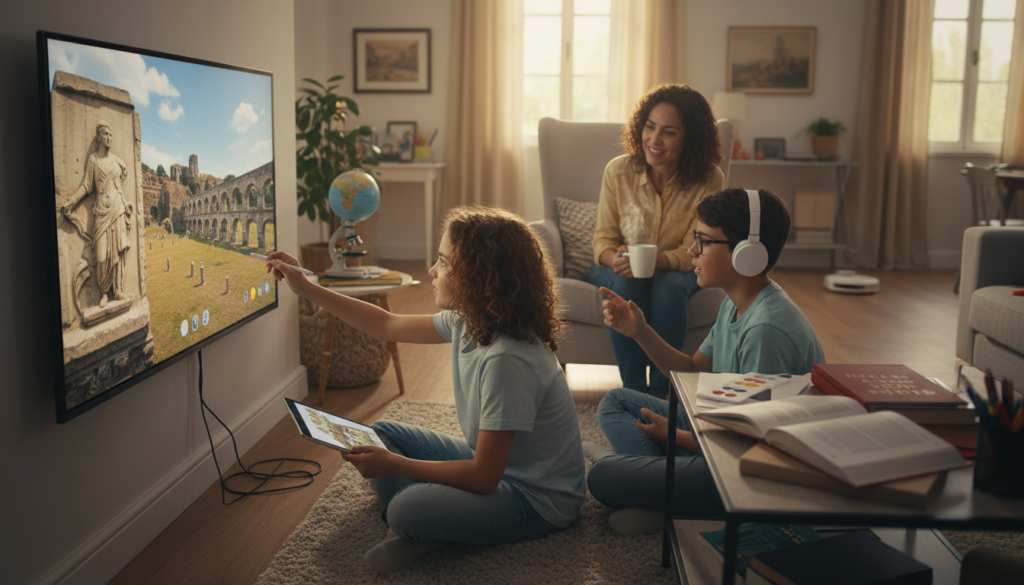
It also makes learning more visual and interactive. Some children understand a topic faster when they can see it. A short animation of the water cycle, a 3D model of the heart, or a virtual tour of ancient Rome can make a lesson click in a way a paragraph alone may not.
Technology has also changed how homeschool families find community. Parents can join online support groups, attend virtual workshops, participate in co-op classes, and find encouragement from other families walking a similar path. For beginners especially, this can make homeschooling feel much less lonely.
A realistic homeschool morning might look like this: your child does 20 minutes of online phonics, reads a physical book with you on the couch, watches a short science clip about bees, then heads outside to observe insects in the yard. That is a healthy blend. The technology supports the lesson, but it does not own the whole day.
How to Use Online Homeschool Tools Without Feeling Overwhelmed
The number of online homeschool resources can feel exciting for about five minutes. Then it can feel like standing in a grocery aisle with 84 kinds of cereal while your toddler is licking the cart handle. There are apps, subscriptions, printable bundles, YouTube channels, online academies, digital planners, and curriculum platforms all promising to change your life.
The trick is to choose fewer tools and use them well. More resources do not always mean better learning. Sometimes more resources just mean more passwords, more tabs, more decision fatigue, and more unfinished lessons.
Start with your actual needs. Do not begin by asking, “What is everyone else using?” Ask, “What problem am I trying to solve?”
Common homeschool problems technology can help solve include:
- “My child needs more math practice.”
- “I need help teaching writing.”
- “We need a better way to track assignments.”
- “My child learns better with videos.”
- “We need affordable science demonstrations.”
- “I need audiobooks for a struggling reader.”
- “My teen wants a self-paced high school course.”
Once you know the problem, choose one tool to test for two weeks. Not five tools. Not the entire internet. One tool.
Try this simple process:
- Pick one subject that feels stressful.
- Choose one digital resource for that subject.
- Use it consistently for two weeks.
- Watch your child’s focus, attitude, and understanding.
- Keep it, adjust it, or drop it.
For example, if spelling is causing tears, you might try a free spelling game or audio-based practice app three times a week. If your child enjoys it and spelling improves, great. If your child rushes through it just to earn game rewards, it may not be the right fit.
Low-cost and free resource ideas include:
- Library apps for ebooks and audiobooks
- Free typing practice websites
- Educational YouTube channels with parent supervision
- Public domain books
- Museum websites
- NASA, National Geographic, or Smithsonian resources
- Free printable worksheets from trusted homeschool blogs
- Podcast episodes for history, science, and literature
- Online flashcard tools
- Digital timers and checklist apps
One common mistake is buying a full-year subscription before testing whether your child actually likes the format. Many programs offer free trials, samples, or monthly plans. Use those first. Homeschool budgets are real, and nobody needs a pile of unused logins collecting digital dust.
Another mistake is expecting an app to fix a habit problem. If a child avoids work, rushes, or guesses, a shiny platform may not solve it. They may still need shorter lessons, parent check-ins, clearer expectations, or a better daily rhythm.
A good online homeschool tool should make your day smoother, not more complicated. If you need a notebook just to remember how to log in, assign lessons, find reports, reset passwords, and print certificates, the tool may be doing too much. Simple often wins.
Balancing Digital Learning With Real-Life Homeschooling
The best homeschool education still includes books, conversations, nature, chores, creativity, movement, field trips, and everyday life. Technology can strengthen those things, but it should not crowd them out.
Children need to touch, build, move, ask, test, fail, and try again. A child can watch a video about measuring cups, but baking muffins will teach measurement in a completely different way. A child can play a geography game, but reading a map on a road trip makes the skill feel real.
This balance matters because homeschooling is not just about finishing lessons. It is about helping children become curious, capable, thoughtful learners. Real-life learning gives children context, confidence, and memorable experiences that screens alone cannot provide.
Try thinking of technology as the “spark,” not always the “whole fire.” A video can introduce a topic. An app can practice a skill. An online class can explain a hard concept. But the deeper learning often happens afterward, when your child talks, writes, draws, experiments, or applies the idea in real life.
Here are simple ways to balance digital and offline learning:
- After an online history lesson, make a timeline on paper.
- After a math app session, solve three problems on a whiteboard.
- After a science video, do a kitchen-table experiment.
- After a virtual museum tour, sketch your favorite artifact.
- After an audiobook chapter, narrate the story aloud.
- After typing practice, write a real email to Grandma.
- After a coding lesson, explain the project without looking at the screen.
You can also create tech-free blocks in your homeschool day. Many families do well with screens later in the morning after reading, chores, and outdoor time. Others prefer to use screens first for independent subjects while the parent works with younger siblings.
There is no one perfect schedule, but there should be a rhythm that protects your family’s peace.
A helpful weekly balance might look like this:
- Monday: Online math and offline reading
- Tuesday: Science video and hands-on experiment
- Wednesday: Audiobook and nature walk
- Thursday: Writing class and notebook journaling
- Friday: Virtual field trip and family discussion
Technology works best when it has a job. When every tool has a purpose, it becomes easier to say yes to what helps and no to what distracts.
Practical Tech Tips Parents Can Use This Week
You do not need to overhaul your entire homeschool to use technology well. Small changes can make a big difference, especially if your current system feels scattered.
Start with a simple family tech plan. This does not need to be fancy. A handwritten list on the fridge works beautifully.
Include basic rules such as:
- School screens happen in shared spaces.
- Entertainment tabs stay closed during lessons.
- Headphones are used only when needed.
- Parent-approved websites only.
- Breaks happen after focused work, not after endless reminders.
- Devices are charged in one central spot.
- No screens during meals unless it is part of a special lesson.
Next, create a “tech basket” or “device station.” Keep chargers, headphones, styluses, login cards, and printed schedules in one place. This prevents the daily treasure hunt for the missing charger, which somehow always disappears right before the online class starts.
You can also make a weekly digital checklist for your child. Keep it short and visual.
Example:
- Math app: Monday, Wednesday, Friday
- Typing practice: Tuesday, Thursday
- Online science lesson: Wednesday
- Audiobook: Daily quiet time
- Virtual co-op class: Friday
For younger kids, use pictures or stickers. For older kids, use a simple planner or digital checklist. The goal is to help children know what to do without asking you 47 times before lunch.
Here are a few smart habits to begin this week:
- Preview videos before assigning them.
- Bookmark approved websites.
- Use a timer for screen-based lessons.
- Sit nearby during new online activities.
- Ask your child to explain what they learned.
- Take movement breaks every 20–30 minutes.
- Keep one full subject offline each day.
Common mistakes to avoid:
- Using screens as the default for every subject
- Assuming “educational” always means useful
- Letting children multitask during lessons
- Skipping parent involvement completely
- Adding too many subscriptions at once
- Ignoring signs of screen fatigue
- Forgetting hands-on learning
Screen fatigue can look like crankiness, zoning out, rushing, rubbing eyes, headaches, or suddenly forgetting how to do work they knew yesterday. When that happens, do not panic. Try a snack, a walk, reading aloud, a whiteboard lesson, or a hands-on activity instead.
One of our favorite DKM-style resets is the “close the laptop and tell me three things” method. After a digital lesson, ask your child to close the device and tell you three things they learned. This quick check helps you know whether the lesson actually landed or just played in the background while your child thought about lunch.
Technology can also support parents, not just students. Use digital planners, reminder apps, online grade trackers, or shared calendars if they reduce stress. But if paper planners make more sense for your brain, use paper proudly. Homeschooling does not hand out extra points for being fancy.
FAQ: What is the best technology for homeschooling beginners?
The best technology for homeschooling beginners is simple, affordable, and tied to a clear need. Start with online homeschool resources like library apps, free educational videos, basic math practice, audiobooks, and a simple planning tool. Avoid buying too many programs at once.
FAQ: How many hours of screen time should homeschoolers have?
There is no perfect number for every family, but homeschool screen time should be purposeful, age-appropriate, and balanced with offline learning. Younger children usually need shorter screen sessions, while older students may use technology longer for online classes. Watch your child’s focus, mood, and quality of work.
FAQ: Can online learning replace a homeschool curriculum?
Online learning can support or even provide parts of a homeschool curriculum, but parents still need to guide the overall plan. Digital learning tools work best when combined with reading, writing, discussion, projects, and real-life practice. Think of technology as support, not autopilot.
We Are Here To Help!
Technology is changing homeschool education in wonderful ways, but you do not have to use every tool, app, program, or platform available. The goal is not to create a high-tech homeschool. The goal is to create a homeschool that helps your child learn well, grow steadily, and enjoy the process along the way.
Start small. Choose one area where technology could make life easier, test one resource, and keep what truly helps. Add offline activities, family conversations, movement, books, and hands-on projects so your homeschool feels balanced and alive.
You are not behind because you are still figuring it out. Every homeschool family experiments, adjusts, and learns as they go. That is part of the beauty of homeschooling.
For more practical homeschool advice, encouragement, and resource ideas, keep reading the DKM Homeschool Resource blog. We are here to help you build a homeschool rhythm that feels doable, thoughtful, and right for your family.